
Skincare Routine
Mento Apps LtdBeauty
4.7104.00 Reviews
- Version
- 7.4.77
- Installs
- 10.00K
- Age Rating
- Everyone
Screenshots
Our Review of Skincare Routine
 Analysis by Appyee
I see skincare apps as most useful when they help you follow a routine you have already chosen, rather than promising to solve every skin concern. Skincare Routine is built around that practical job: keeping daily care organized and making it easier to notice changes over time. That focus gives it a clear purpose, though I would approach its guidance as a planning aid—not a substitute for professional advice or a guarantee of better skin.
A useful organizer, not a magic fix
What appeals to me is the link between a daily regimen and a record of how your skin responds. A product can seem promising on its own, but it is hard to judge its place in a routine if you cannot remember when you started using it or what else changed at the same time. Tracking encourages a more deliberate approach: change fewer things at once, give your skin time to respond, and record observations consistently instead of relying on a vague impression.
That is especially helpful when you are trying to work out whether a new moisturizer feels comfortable, whether a cleanser leaves your skin feeling tight, or whether a routine is simply too complicated to keep up. The app’s value is less about instant transformation and more about helping turn scattered intentions into a repeatable habit. For me, that is a realistic promise—and a more useful one than treating skincare as a sequence of products that must produce overnight results.
Where its guidance needs a human check
Personalized suggestions can make a routine feel less intimidating, but a questionnaire cannot capture every detail of someone’s skin or health. I would use recommendations as a starting point, then pay attention to how my skin actually feels and make changes cautiously. If a product causes a persistent or worrying reaction, an app should not be the final word; asking a qualified professional is the sensible next step.
The same restraint applies to ingredient explanations. They can help make labels less mysterious, but an ingredient’s presence alone does not tell you whether a finished product will suit you. Formulation, concentration, how often you use it, and what else is in your routine all matter. The useful habit here is to treat ingredient notes as context for a better question, not as a simple pass-or-fail verdict on a product.
There is also a personal trade-off in recording progress. Notes are only valuable if you can keep them up, and a routine with too many entries or reminders can become another chore. I would begin with the products and observations that matter most, rather than trying to document every detail from day one. A small record you maintain is more informative than an elaborate one you abandon.
How it fits among other skincare tools
Compared with a notes app or a paper checklist, a dedicated skincare organizer can keep routine-related information together and make the habit feel more intentional. A plain calendar may be enough if all you need is a reminder; a spreadsheet may suit someone who wants complete control over how they record changes. This app makes more sense for someone who wants a skincare-specific place to manage the routine and follow progress, rather than building a tracking system from scratch.
It is not necessarily the best fit for someone who already has a simple routine and remembers it without help. Nor would I choose an organizer as the main resource for diagnosing a condition, checking whether a treatment is medically appropriate, or resolving a significant reaction. Its strongest role is everyday organization: it can support consistency, but the judgment about what belongs on your skin remains yours.
A realistic way to use it
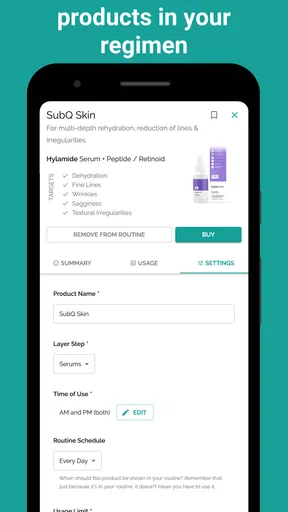
Imagine you add one new product after your usual evening cleanse. Rather than changing several steps at once, you can keep the rest of your routine steady and use the app to stay consistent with the plan and note how your skin looks and feels. If you later notice a change, that record gives you a clearer reference point than memory alone. It will not prove what caused the change, but it can help you describe the sequence more accurately—to yourself or to a professional.
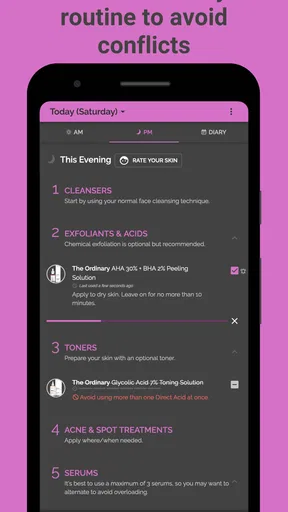
A second useful approach is to use the routine view as a quick morning or evening checkpoint. If you tend to forget a step when you are tired or rushing, a concise schedule can reduce the mental effort of remembering what comes next. I would keep reminders helpful rather than relentless: the goal is to build a routine that works in real life, not to feel guilty whenever a notification arrives at an inconvenient moment.
What Makes Skincare Routine Stand Out?
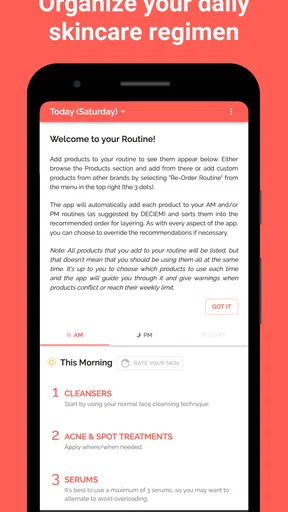
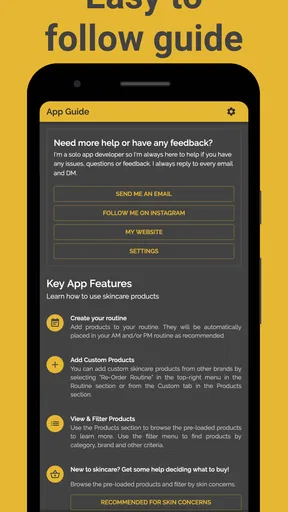
First off, let’s talk about the layout. The app greets you with a sleek and intuitive interface. It’s like having a skincare guru in your pocket, minus the hefty consultation fee. The home screen gives you a quick glance at your daily routine, complete with timings so you can easily weave it into your busy schedule.
Personalized Recommendations
One of the standout features is how it tailors recommendations based on your skin type and goals. When you first start using the app, you fill out a detailed questionnaire about your skin concerns—be it acne, dryness, or anti-aging. Based on your responses, Skincare Routine crafts a personalized regimen just for you. It feels like having a dermatologist on speed dial.
Ingredient Insights
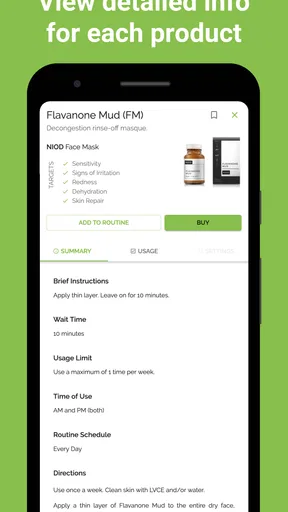
Ever stood in the skincare aisle feeling overwhelmed by the list of ingredients on product labels? The app breaks down each ingredient in your products, explaining their benefits and potential side effects. You’ll feel like a skincare scientist in no time, making informed choices about what you’re putting on your skin.
Track Your Progress
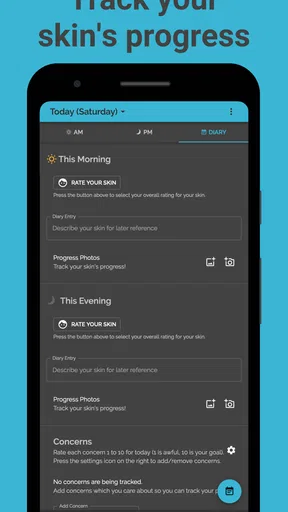
Consistency is key in skincare, and the app knows it. With its progress tracker, you can log how your skin is responding over time. This feature is particularly handy for seeing how your routine is working—or not. Plus, it motivates you to keep up with your regimen when you see those glowing results.
Community and Support
Feeling like you’re in this skincare journey alone? The app includes a community feature where you can share tips, ask questions, and get advice from other users. It’s a supportive space where you can learn from others’ experiences and maybe even make a new friend or two.
Notifications and Reminders
Let’s be real—life gets busy, and it’s easy to forget to apply that night cream. Luckily, the app has your back with friendly reminders to keep you on track. It’s like having a skincare buddy who gently nudges you to stick to your routine.
Sync Across Devices
For those of us who use multiple devices, the app can sync across all of them. Whether you’re checking your routine on your phone or tablet, your progress and reminders are always up to date. It’s all about keeping things convenient and hassle-free.
Final Thoughts
So, is Skincare Routine worth downloading? Absolutely. Whether you’re a skincare novice or a seasoned pro, the app offers something for everyone. From personalized routines to community support, it’s a comprehensive tool that makes caring for your skin not just easier but genuinely enjoyable. So, give it a whirl and watch your skin transform!
Price, platform fit, and who should try it
Skincare Routine is a paid beauty app from Mento Apps Ltd, priced at $3.99, so I would treat the purchase as a choice about whether a dedicated organizer is worth more to me than a free note or calendar. Its average rating is 4.7 from around 700 ratings, with over 100 written reviews and 10K+ installs. Those figures suggest that it has found an audience, but they do not tell me whether its particular approach will fit my habits. I would decide based on whether I am likely to use a skincare-specific tracker regularly.
The app is rated for Everyone, and its current version is 7.4.65; it runs on devices with version 8.0 or later. It was released on August 13, 2018, so it is not a newly introduced idea. For someone considering an install, the practical question is whether their device meets that minimum and whether they prefer an app built around skincare rather than a general-purpose checklist. If I only wanted a one-line reminder, paying for a dedicated tool would be harder to justify.
I think it is best suited to beginners building a manageable routine, or to people who have several steps and want a reliable way to keep them straight. It may also suit someone who is comparing how their skin responds over time and wants a record to refer back to. I would skip it if I dislike entering information, already have a dependable system, or expect an app to diagnose a condition. The most useful setup is the one you can keep using after the novelty wears off.
Small habits that make the tracking more useful
One practical tip is to write observations in plain, consistent terms rather than trying to rate every detail. A short note such as “felt dry after cleansing” is easier to compare with another evening than a long description written only when something dramatic happens. If you are monitoring a new product, keep other routine changes to a minimum where possible. That makes your notes easier to interpret, even though it cannot establish a medical cause.
Another trade-off is how to handle missed steps. I would not treat an unfinished day as a failure or try to compensate by doubling up later. Use the next reminder as a prompt to resume the normal plan, and record a missed step only if it helps explain a change in your routine. A tracker should make self-care easier to manage, not turn it into a scorecard.
For someone who shares skincare ideas with friends, the community can provide perspectives and practical suggestions, but I would keep its advice in proportion. Other users’ experiences are not personalized medical guidance, and a product that suited one person may not suit another. The community is most valuable for exchanging everyday tips and feeling less alone, while decisions about persistent symptoms or treatment belong with a qualified professional.
My final recommendation
My overall view is positive, with a clear condition: this works best when you want structure and will actually use the tracking. Its combination of routine planning, reminders, progress notes, ingredient explanations, and community gives it more focus than a bare checklist, while still leaving the important choices in your hands. I would recommend it to a person who wants to make skincare more consistent without relying on memory, but not to someone seeking a diagnosis or a hands-off promise of results.
If you are deciding whether to pay for it, ask yourself one simple question: would keeping a skincare routine and noticing changes be easier in a dedicated app than in the tools you already use? If the answer is yes, Skincare Routine has a sensible, specific role. If your needs are only occasional reminders, a free calendar or notes app may be enough. Either way, I would keep expectations measured: the app can help you organize care, while patience and informed choices do the rest.
Verdict
Strengths of Skincare Routine
- Customizable reminders for routines.
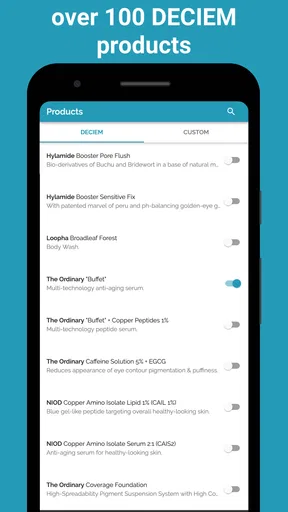
- Extensive database of skincare products.
- User-friendly interface for beginners.
- Tracks progress with detailed analytics.
- Community tips and product reviews.
Limitations of Skincare Routine
- Limited free version features.
- Occasional app glitches reported.
- Requires internet for full functionality.
- Ads in the free version can be intrusive.
- No dark mode option available.
Similar Picks in This Category
View All
Beauty Makeup Editor & Camera
Photo & Video Editors - Instant Solution4.7

Perfect365: Face Makeup Editor
Perfect365, Inc.3.5

Mirror Plus - HD Mirror app
Digitalchemy, LLC4.8

Cute Lock Screen & Wallpapers
Prometheus Interactive LLC4.6

HD Camera for Android
One Music Player4.5

Phone Mirror app - True Mirror
Cards4.6
Frequently Asked Questions
What features does the Skincare Routine app offer?
The Skincare Routine app provides personalized skincare recommendations, a product ingredient analyzer, and a daily routine tracker. It also offers reminders for your skincare regimen, educational content about different skin types, and the ability to log skin progress through photos. It’s designed to help users achieve healthier skin by using tailored advice.
Is the Skincare Routine app suitable for all skin types?
Yes, the app is designed to cater to all skin types. During the initial setup, you’ll answer a series of questions about your skin’s characteristics and concerns. The app then uses this information to offer customized skincare routines and product suggestions, ensuring that all skin types receive the appropriate care.
Are the product recommendations in the app reliable?
The app provides product recommendations based on user input and skin type analysis. It sources information from dermatological studies and user reviews. However, it’s always advisable to consult a dermatologist or conduct a patch test when trying new products to ensure they suit your individual needs and allergies.
Does the Skincare Routine app require a subscription?
The app offers both free and premium versions. The free version includes basic features like routine tracking and reminders. Premium users gain access to advanced features such as in-depth ingredient analysis, expert skincare tips, and personalized product recommendations. Subscription details can be found within the app's settings.
How does the app handle user privacy and data security?
User privacy and data security are top priorities for the Skincare Routine app. It employs encryption to protect personal information and follows industry standards for data protection. Users have control over their data and can choose what information to share. Detailed privacy policies are available within the app for review.
